Showing posts with label Google Analytics. Show all posts

Tuesday, December 8, 2015

Conversion Tracking


Tracking a company website's conversion rate is very important. In this blog I am going to tell you how Weebly can help you gain an understanding of how to track conversions.

On Weebly, you can create a website and design it however you want. Weebly gives sample pictures and backgrounds, however you can add custom ones if you want or need to. For my background image I used a picture of a golf glove and a tee because I love to play golf. To track conversions on the Weebly website I made I created a contact form. The contact form allows someone to enter his or her first name, last name, e-mail, and any comments that they have. I was not using this as an actual website for something but just to learn how to track conversions. When people entered their name, number, e-mail, and comments, and then click submit, it would register as a conversion. When they click submit it would take them to a page that said thank you.

To track conversion rates and other important information such as bounce rate%, visits, and page views, I linked the Weebly site to google analytics. To do this, you must click admin in Google Analytics. This will all you to copy the name of your website and url so that everything can be tracked. Once you copy the website url and name, Google Analytics will give you a tracking ID to paste in the settings of your weebly account. The ID will allow all the site information to be transmitted to your Google Analytics account.


Tuesday, October 13, 2015

Fun with eCommerce Analytics Part II

In Week 6's Google Analytics Blog, I talked about eCommerce and how to create a Shopify account. In this blog, I am going to talk about Adwords and how they relate to Google Analytics. Like Google eCommerce, Adwords are billion dollar industries. Adwords give you the ability to track conversions, which means that you can trace things all the way from an ad through the purchase. Tracking conversions is what makes Adwords so important. If you are looking to be an online marketer, adwords is something you must learn about.

Getting Started with Adwords 

So now that you understand what Adwords allow you to do, I am going to give you a guide on how to get started with Adwords. To start and Adwords account, go to www.google.com/adwords. There are
 links on the homepage such as "Success Stories" and "How it Works". Those links may be helpful to you if you want some insight before creating an account. When you are ready to get started, click "Get started now". Once you have put your information in and created your account go to Tools > Conversions, and then click Conversions. This process is going to allow you to set up a connection between Adwords and the eCommerce site you have created. Setting up this type of connection will allow you to track what's going on in your eCommerce site. This is useful because it will allow you to see how much of your spending $ on Google resulted in making $ in revenue on your eCommerce site.


Once you have clicked the conversion button and set up a connection with your e-commerce site, you can pick a conversion name, and then click save and continue. The next step is to click "the value of this conversion action may vary".  Click that option allows you to set different prices. Once you have done that, you must set the conversion category to Purchase/Sale and check to make sure the markup language is set to HTML. The last step is to click "I make changes to the code". This will allow you copy and past the code that will be generated into your website's HTML.

Connect Adwords to Shopify

To connect Adwords with your Shopify account, go in to Shopify's settings, and click checkout. Then paste your HTML code into the "Additional and content and scripts" area and click save.  For more information on this you can click the following link: http://docs.shopify.com/manual/your-store/dashboard/google-adwords.


Thursday, October 8, 2015

Fun with eCommerce Analytics

In this blog, I am going to tell you how to get started with a Shopify account. Creating a Shopify account is one of the easiest ways to set up a "real" eCommerce system to help learn about tracking ROI with analytics. Tracking ROI is at the core of Google' success, and it is argued that tracking ROI is a trillion dollar skill because of much revenue Google helps businesses make. In addition, conversion tracking is an exciting skill to trace and it is an important skill. Companies will like to see that you have experience with setting up an eCommerce site and generating analytics.

Steps to setting up a Shopify site

To get started, go to their website shopify.com and click get started. There is an option that allows you to do a free 14-day trial, but in order to do the conversion tracking you are going to have to pick a plan and spend approximately $29.95 a month. $29.95 may seem like a lot of money, but given the impact it could have on your career or business, it could be worth it. Once you pick a plan, the next step is to enter your e-mail address, a password, and a store name. Your store name could be anything you want it to be but it would probably be best if you relate the name of the store to your product. If you are having trouble thinking of a name, you can start off using your initials. Once you have decided on the name, choose the online store check box and click next.


The next step will be choosing where you want to sell your product. You can choose to sell it through an online store or through a retail store/popup shop. Once you decided on where to sell your product it will allow you to enter your name and address information.


Lastly, you will have to describe what you will sell and answer if you have the products ready to sell. When giving details about the product, the website asks for a name, description, and to provide a type and vendor to categorize the product. In addition to describing the product, adding an image will be helpful because it will draw attraction to it.

You can find the rest of the steps to building a shopify account from http://www.amazon.com/CASA-Marketing-Intro-Google-Analytics/dp/1517041678. The paperback costs $24.99 or you can view the book off of a kindle for free if you have kindleunlimited.


Tuesday, September 29, 2015

Reviewing Performance of Campaigns

If you have created a blog or a Facebook ad, it is important to review the performance of it. Gaining clicks from an ad are important because it means that people are going on to your blog, but clicks are not the whole story. If you have made a Facebook ad campaign, you can go on Facebook to see how everything is going: http://www.facebook.com/ads/manage. This will show your campaign name, number of website clicks, cost per click, number of people it has reached and the amount you have spent to date.
In addition to using Facebook, you can look at Google Analytics to see how many clicks have arrived from various sources. Google Analytics has a lot options for you to choose from but it is better to use these options to look for specific information. Some information that Google Analytics offers is the number of sessions, users, page views, average session duration, and bounce rate. One of the more important ones is Bounce Rate %. Bounce Rate percentage is the number of people who enter your site and leave rather than view pages within the site. This is important because having a high Bounce Rate percentage lets you know that people are not staying on your site or searching through it. The goal is to have an attractive site that people stay on and look through different pages.


Location
Location can be a fun thing to look at in Google Analytics. If you go on Google Analytics, you can find this on the left hand side under Geo. After you click Geo, click Location and it will give you a visual sense of what sessions were from where. This will allow you to see if people are visiting your site from all over the world or in one distinct area of the world.


Mobile

Mobile would be a smart category to look at in Google Analytics. Mobile use has increased throughout the world and it seems nowadays that everyone wants to go "mobile". To see what percentage of traffic is coming from different devices, click Audience and then click Mobile. This information can be valuable to businesses because it shows where the highest percentage of their traffic is coming from. For example, the most traffic may be coming from mobile users, desktop users, or tablet users. If it shows that mobile is the highest percentage, you may want to start looking at designing your website to be more "mobile friendly".


Making Google Analytics Easier to Look At

If you are working a job that requires you to look at web analytics for a website, and you are trying to find certain items it may be very time consuming. To make it less consuming, Google has created "dashboards".  To find dashboards on Google Analytics, click on reporting at the top, and then new dashboard.  They give you a default, but setting a data range will help you get the information that will be most relevant.  An example would be using "last week" as a data range to use for regular weekly reports.  Lastly, the dashboard tool is also great to use because it allows you to manually export a file to share with a colleague or client.


Thursday, September 24, 2015

Getting Traffic for Analytics

To get started in Google Analytics, you must first make a blog or website that you are going to monitor.  Once you have made your blog or website, you need to find a way to generate traffic.  One of the easiest ways to generate traffic to your blog or website is by sharing your link on any social media accounts such as Facebook, Twitter, and LinkedIn.  To gain connections on any of these social media websites you can use the feature where you share email contact, and the programs can suggest new connections.  This will make it easier to have some connections to work with and it will allow you to move onto the next step which is posting the link of your blog or website and posting an invitation to social media.  If it is a blog you created, you have to be careful when you are posting the link to the social media website you have chosen.  There is a blog link and there are links to individual blogs.  The one you want to post on social media is the "longer" link.  Lastly, a great way to get noticed in social media is visuals.  When you post the links to your social media website make sure you have pictures or graphs in all of your posts.


Making a Facebook Ad is another great way to add more clicks to your blog.

Step 1: Go to https://www.facebook.com/ads/create and click on the "Clicks to Website" option.  There are many different options it offers but the best one for now would be "Clicks to Website".  After you click this option, you can copy the blog link of your own personal blogger.

Step 2:  Once you pick clicks and attach your link, you will be asked to select an audience that you would like to target  There are a few different options such as age range, geographical area, interests and behaviors.  However, it is important to pick certain interests because it help your blogs get more clicks.

Step 3: In addition to selecting a "target market" to gain clicks, it is important to add a picture or two. Images will help attract people to your blog and gain your blog clicks.  You can add a picture by uploading one, or using the free stock images available.  Once you pick the image you are also given the option to crop the image to change how they appear in your ads.  Facebook gets a little complicated when it comes to the images, so you just need to make sure it is the right size that Facebook requires.

Step 4:  The next step is to pick your budget for the ad.  The two different options for the budget are per day, or Lifetime Budget.  You then have to choose how much money you want to spend and how many days you want to spend it for.

Step 5: Now that you have selected your criteria for your ad, you are ready to go!  Just click place order, add your credit card and you can begin tracking "Clicks to Website".


Tuesday, September 15, 2015

Connecting Google Analytics With a Website

Creating a blog is a great way to get started in Google Analytics.  To create a blog on blogger.com, you must first create a Google account.  Creating a Google account is very easy, and it gives you access to many different tools that Google offers.  Once your Google Account is created you can go to blogger.com, sign into your created Google account and get started.  Blogger.com is great because it allows you to keep track of a webpage and understand what information you can obtain from it.  It may not be an actual website where you can purchase something or sign-up for something, however it is still something to help you get a head start on learning Google Analytics.


On Google Analyitcs, there is a lot of data that you can keep an eye on.  In my case, the website I would be using to keep track of would be blogger.com (Eric Rubel's Blog).  Google Analytics allows you to see how many people have been visiting your site, and it allows you to look at their behavior on your site.  A few examples of information that Google Analytics gives you about the visitors to your site are the number of page views, average session duration, bounce rate, and % of new sessions.  This information would be very useful because it can tell you how much visitors are taking a look at your website and how long they are staying on it.  It will help businesses see if they have a good website or if they need to fix their website if their number of visitors are low or if the bounce rate % is high.  Lastly, Google Analytics also allows you to track revenue and goals based on how many people are purchasing or signing up for something.

Tuesday, September 8, 2015

Introduction to Google Analytics

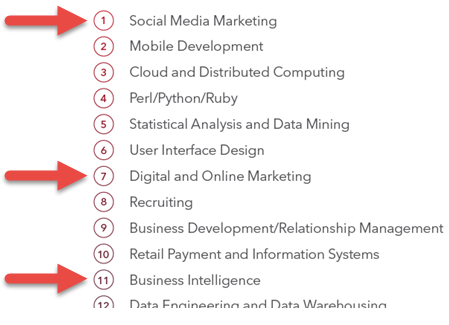
Google Analytics seems to be a skill that is very valuable to anyone applying for a business job.  Technology has become a huge part of our society and it is heavily influencing the business world.  As show below, some of the top skills related to analytics that have got people hired are social media marketing, digital marketing, and business intelligence.  Learning Google Analytics will allow someone to have a better chance to get a job in any of those mentioned above.  Although it sounds like analytics would be a be based off of all numbers, it's not.  Google Analytics allows you to measure and optimize the performance of your online marketing campaigns, and allows you to learn how the performance of website fits into business.  In our society today, Google Analytics is definitely something one would want to look into learning because it can be a difference maker in the job market.

2013 top skills that got people hired


As mentioned above, technology has become of a huge part of our society.  Technology has made it easier for people to be in contact with everything going on in our world today.  Some popular social media channels are Facebook, Youtube, and Twitter.  Learning Google Analytics will also help anyone who wants to see how business social media efforts are going on any of the websites mentioned.  You are able to see who is talking about your business or how many follows or likes your pages are getting.  Businesses understand that society is always on social media nowadays, so many businesses are creating twitter accounts or Facebook accounts to market to consumers about their products or special offers they may be offering.


Conclusion
Google Analytics is a great tool for anyone to learn who is interested in some type of online marketing.  Social Media and Technology are a huge part of our society, so online marketing and social marketing are vital to many businesses and organizations.  So if you are having trouble finding a job in the business world, adding Google Analaytics add to your resume may be your answer to landing a job.